
Starlink Authorised Technology Provider
Supercharge Your Starlink with Peplink
Peplink routers turn a single Starlink dish into a resilient, manageable network connection — automatic failover, multi-WAN bonding and centralized control for everything from a corner-shop point-of-sale terminal to a 5,000-passenger cruise liner.

Why Pair Them
What Peplink Adds to Starlink
Starlink delivers the satellite link. Peplink turns it into a managed, resilient part of your network — alongside fibre, cellular and Wi-Fi, not instead of them.
Backup Terrestrial with Satellite
Automatically fail over to Starlink the moment your fibre, wired or cellular connection drops — no manual switching, no dropped sessions.
Use Multiple Starlinks Together
Connect and bond several Starlink terminals for extra throughput and redundancy — useful anywhere one dish alone isn't enough.
Manage Everything in One Platform
Control Peplink routers and Starlink equipment side by side from InControl, our browser-based management platform — no separate consoles.
Router Features Built for Starlink
Stow/unstow control, dish health monitoring and outbound policies designed specifically for Starlink's network behaviour, not bolted on after the fact.
Where It's Used
Common Deployment Scenarios
Peplink and Starlink together are deployed anywhere a single connection type can’t be trusted on its own.
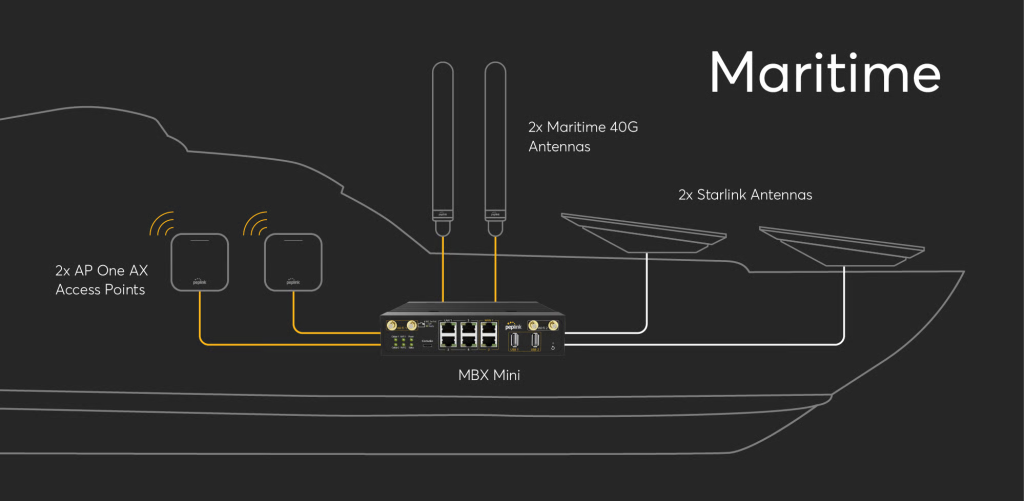
Maritime & Offshore
Vessels, yachts and offshore operations need connectivity that survives extreme weather and long stretches out of cellular range — Peplink and Starlink together hold the link when nothing else can.
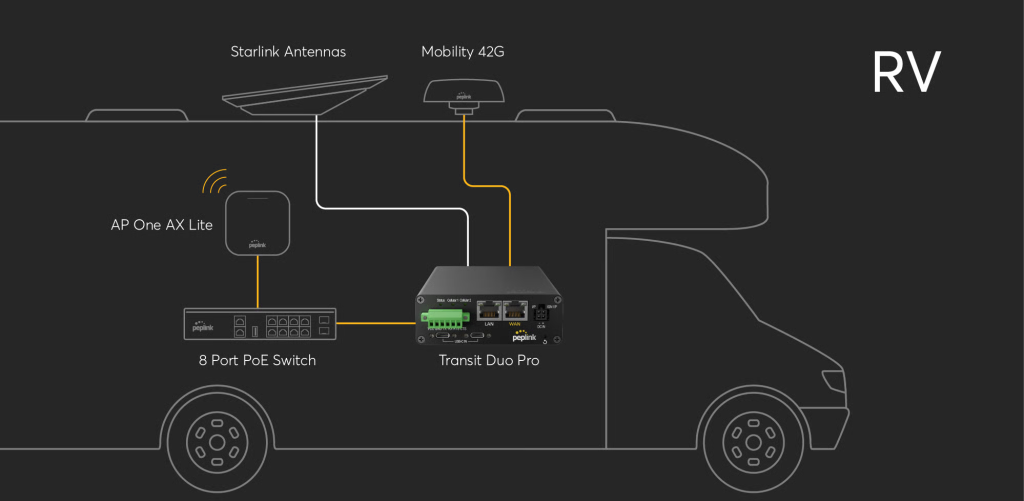
RV & Mobile Operations
Constantly on the move needs seamless handover across territories and networks — Hot Failover switches between Starlink, cellular and Wi-Fi automatically as conditions change.
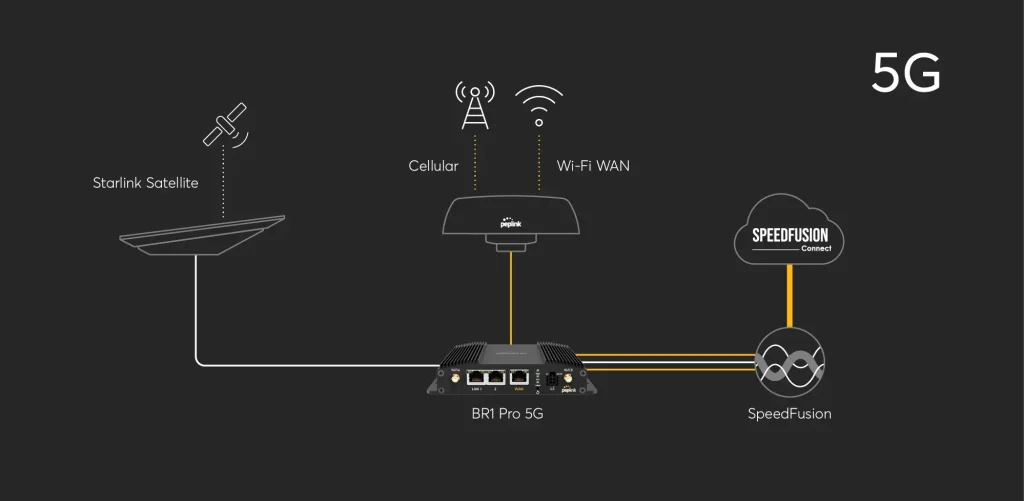
5G-Bonded Connectivity
Bond 5G with Starlink for maximum flexibility and bandwidth — ideal for areas with emerging 5G infrastructure, creating a redundant, high-performance network from two connection types at once.
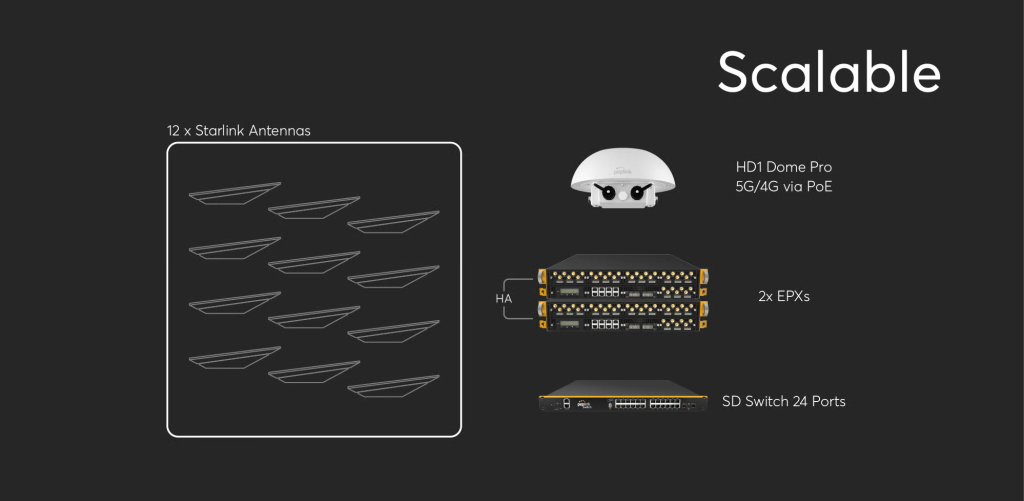
Scalable, Multi-Site Networks
From a single site to an enterprise-wide rollout, Peplink and Starlink scale together — multi-WAN management and centralized control across every location.
Key Capabilities
What Peplink's SD-WAN Engine Does With Starlink
Four capabilities that turn a Starlink terminal from a single connection into a managed part of a resilient network.
Seamless Connectivity, Even When Starlink Drops
Sessions persist with zero downtime — if Starlink gets cut off, Hot Failover falls back to a standard cellular connection automatically, without interrupting active applications or connections.
Full Control Over What Travels Through Starlink
During peak hours, send priority traffic through other WANs so latency-sensitive applications aren't competing with Starlink's variable performance. Route high-bandwidth, low-priority traffic — like large downloads — through Starlink during off-peak hours to make full use of your data plan.
Combine Starlink With Itself, or With LTE
Multi-Starlink Bonding
Combine several Starlink connections for extra redundancy — useful where nothing else works, such as cruises or remote events.
Starlink + LTE Bonding
Combine Starlink's bandwidth with LTE for seamless connectivity in remote areas — suited to mobile and maritime deployments where connectivity has historically been unreliable.
Firmware 8.4.0+
Supercharged Starlink Integration
Deeper Starlink-specific control, available on Peplink firmware 8.4.0 and above.
Focus: Stow / Unstow
Control your Starlink antenna directly from Peplink’s UI and synchronize multiple antennas at once. Stow or unstow with a single click in InControl, instead of relying on Starlink’s own router.
Focus: "Least Used" Outbound Policy
A new outbound policy — requested directly by Starlink — prioritizes whichever WAN has the most available uplink, for more efficient use of multi-WAN networks that include Starlink.
Centralized via InControl
Every stow/unstow action, outbound policy and failover event is visible and controllable from the same InControl dashboard you already use to manage your Peplink fleet.
Common Questions
Starlink x Peplink — Frequently Asked Questions
Do Peplink routers support Starlink?
Yes — Peplink routers are fully compatible with Starlink terminals and add enhanced management capabilities on top of the connection itself, including failover, bonding and centralized control.
How do Peplink routers enhance my Starlink setup?
Peplink adds intelligent failover, multi-WAN bonding, traffic steering and centralized management through InControl — turning a single Starlink dish into one managed connection alongside fibre, cellular and Wi-Fi.
Can bandwidth bonding be applied to Starlink?
Yes — you can bond multiple Starlink connections together for redundancy, or combine Starlink with LTE or Ethernet for increased bandwidth, depending on your deployment.
Do I need a subscription to use Peplink devices with Starlink?
Basic functionality requires no subscription. Advanced features such as InControl management and premium support are available with optional subscription plans — ask a specialist about the right plan for your deployment.
Which router should I pair with a Starlink Mini dish?
It depends on your deployment type and whether you need an all-in-one enclosure or a separately-mounted router — a specialist can confirm the right MAX Series or Antenna MAX pairing for your Starlink Mini setup.